How to Manage Your Mods in SWGOH
The routine I run every week or two to sort, sell, level, slice and calibrate mods in Star Wars Galaxy of Heroes, built around speed.
Watch the walkthrough: I recorded myself running this whole process on my own account, start to finish. Watch it on YouTube. This is basically the written version of that process.
Mods are one of the biggest sources of power in SWGOH, and there's always more to do with them. New mods keep coming in, there are always more materials to spend, and there's always another character that could use an upgrade.
Like everything else in this game, there's a lot of maintenance involved. I think you just need to find a method you can apply consistently and quickly so you don't burn out.
My method is probably a bit more involved than some. What I'm trying to do is quickly spot the mods worth investing in and keep upgrading them. The mods that stay worth it keep getting invested in. The ones that don't fall off and get sold.
It isn't perfect. I'm mostly eyeballing things, and I'll miss a mod here and there or overinvest in one now and then. You have to be OK with that. I like to do this in batches every week or two.
The basics
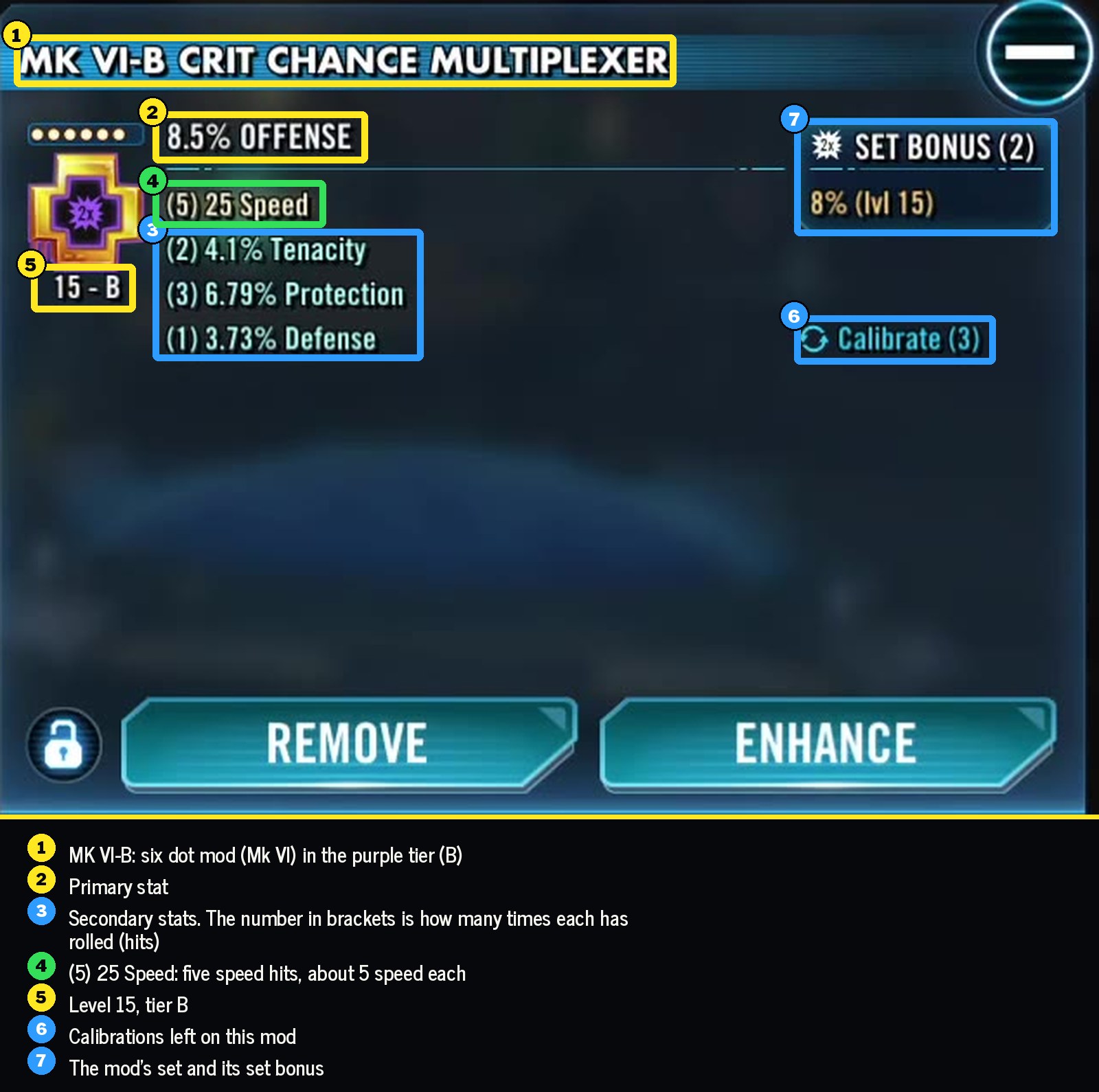
- Primary stat. The main stat on the mod, shown in its title, like 8.5% Offense or 16% Health. Arrows are the only mods that can have Speed as a primary.
- Secondary stats. Up to four smaller stats under the primary. Speed is the secondary that matters most, and everything in this process is sorted and judged by it.
- Hits. The number in brackets next to a secondary is how many times that stat has rolled. (3) 16 Speed means three hits for 16 speed, about five per hit. More speed per hit means a better mod.
- Level 15. Leveling a mod with credits reveals its secondaries and adds rolls as it goes. A mod isn't finished until it's at 15.
- Tier. Grey, green, blue, purple, gold. Slicing moves a mod up a tier and adds a roll to a random secondary.
- Five dot and six dot. A gold five dot mod can be sliced to six dot, which raises its stats. Six dot slicing uses the hardest materials to get in the mod system.
- Calibration. Only on six dot mods. You pick a secondary, one roll is taken off it, and a new roll lands on a random secondary. You can keep or discard the result, but you pay for the attempt either way. Each mod has a limited number of calibrations and the cost changes from mod to mod, so check it first.
Most of this happens in Batch Manage Mods, where you can filter, sort, sell and upgrade a lot of mods at once.
Step 1: Sell the mods with no speed
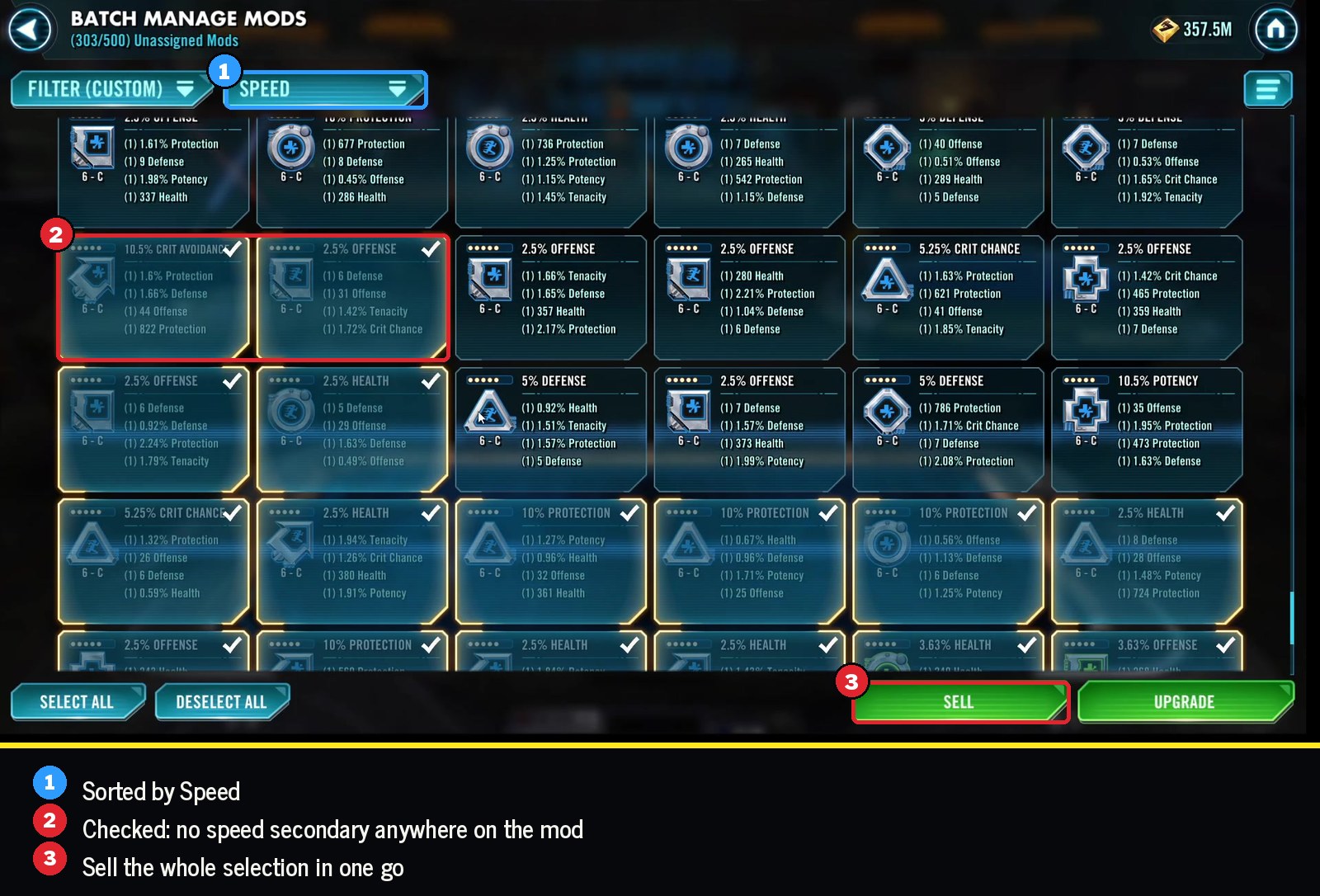
Open Batch Manage Mods, reveal all the secondary stats and sort by speed. Then select everything with no speed at all and sell it.
A mod with no speed can be good on a certain character. Finding those few takes time and resources, though, and I don't think it's worth it. Getting rid of them keeps the rest of this fast.
Step 2: Keep a low speed mod only if something jumps out
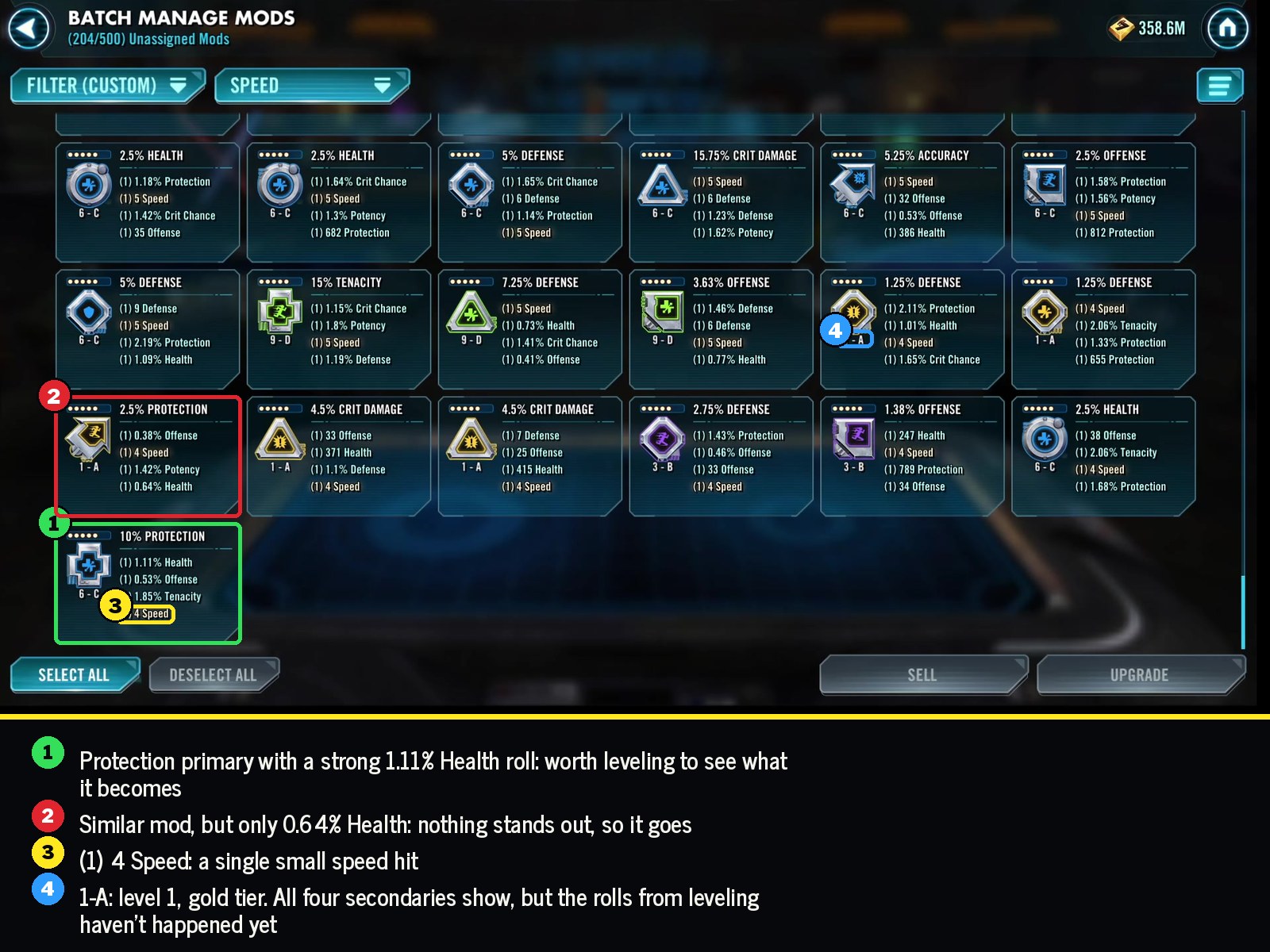
A mod with a single small speed roll, around 4 speed, is on the cutting block for me. I have enough speed mods on my account that I really want to see 15 speed or more before I invest in taking a mod up a tier.
Every so often something else about a mod catches my eye: a good primary for its slot, plus high rolls in stats that fit it. In the walkthrough it's a health mod with a protection primary and really good health and offense rolls. That's the kind of low speed mod I might level just to see what happens.
You'll get an eye for this as you go. Compare a mod's rolls with the others on screen and the high ones stand out pretty quickly.
Step 3: Level everything to 15, then work up from the bottom
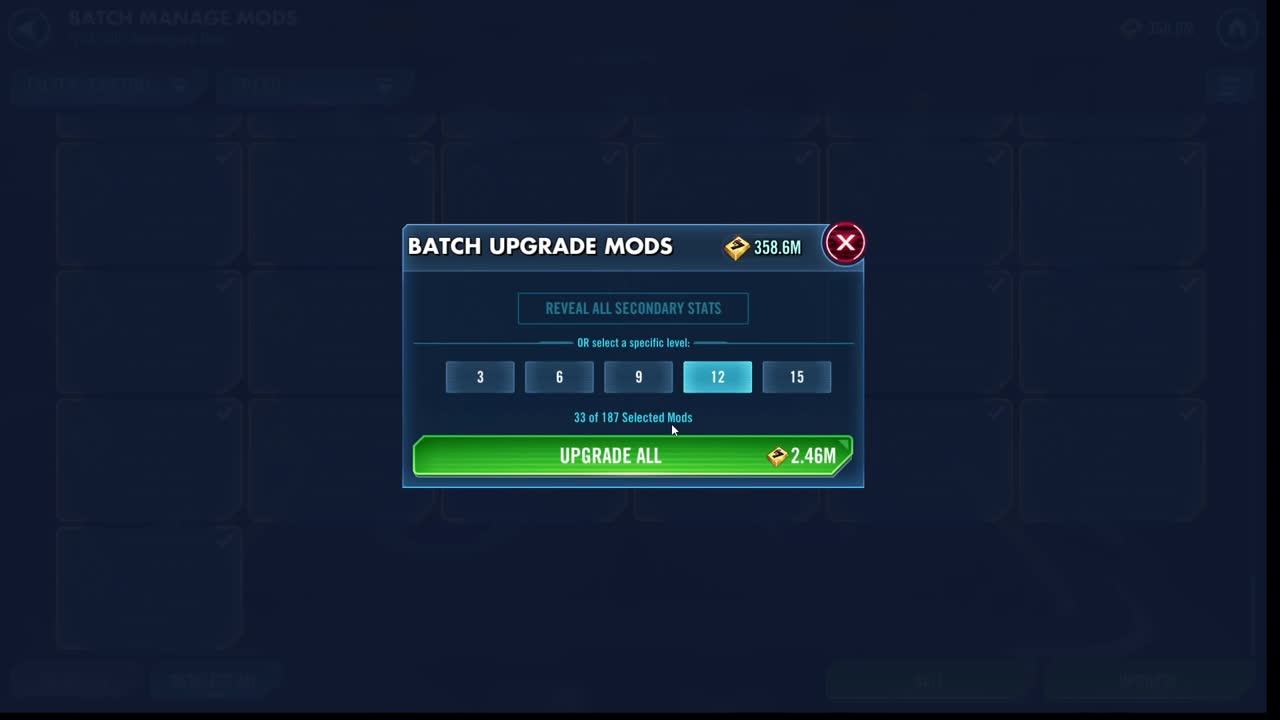
Select what's left and batch upgrade it to 15. If credits are tight, it can be worth leveling in stages, 6, then 9, then 12, and only keeping going with the ones that rolled well. Credits are easy enough to come by on my account now that I usually take everything to 15 and sort it out from there.
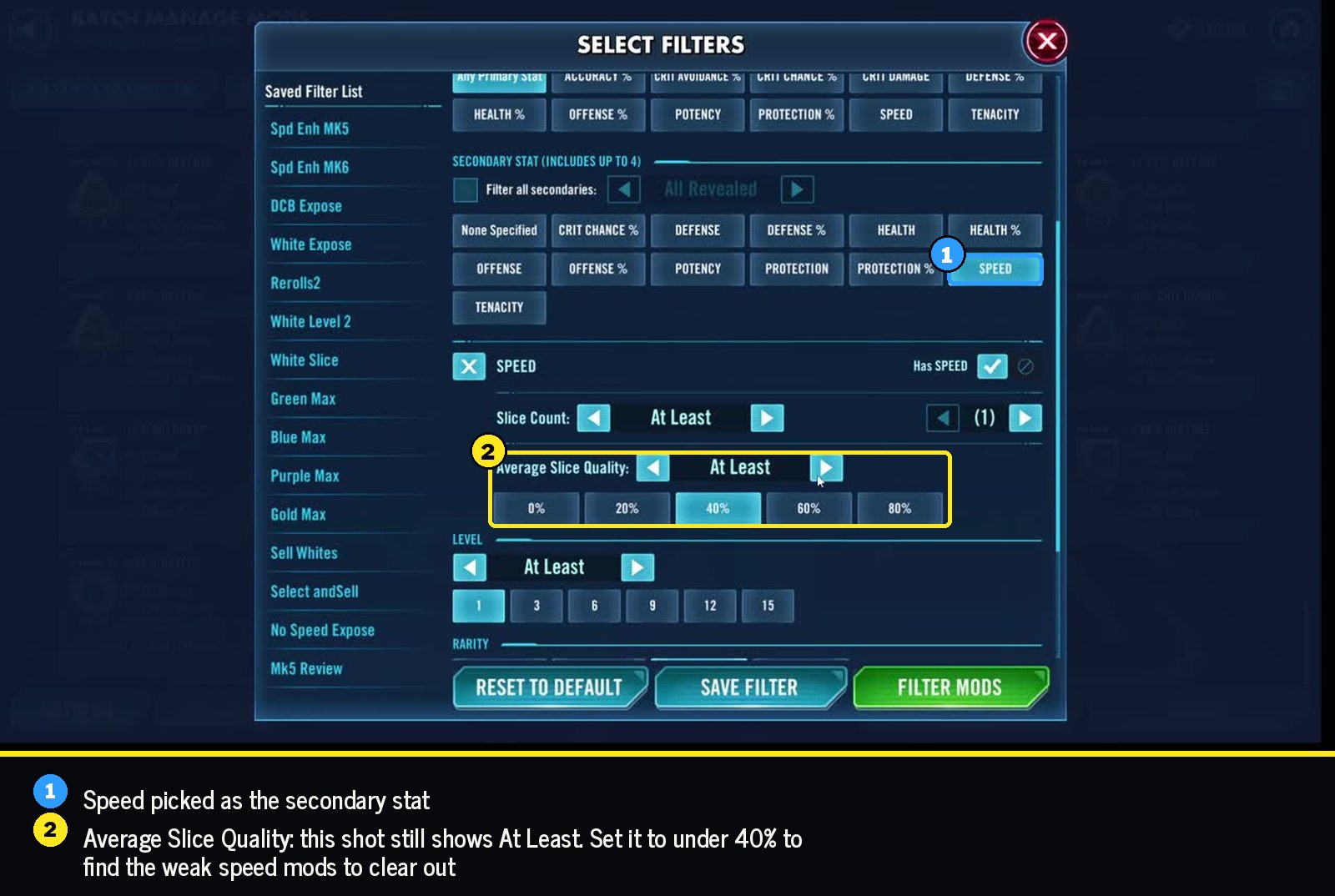
Once everything is at 15, sort by speed, start at the bottom and work your way up. If you have a ton of mods, filter first. In the filter menu, pick Speed as the secondary and set Average Slice Quality to under 40% or so, then clear those out before you look at anything by hand.
Quick cuts
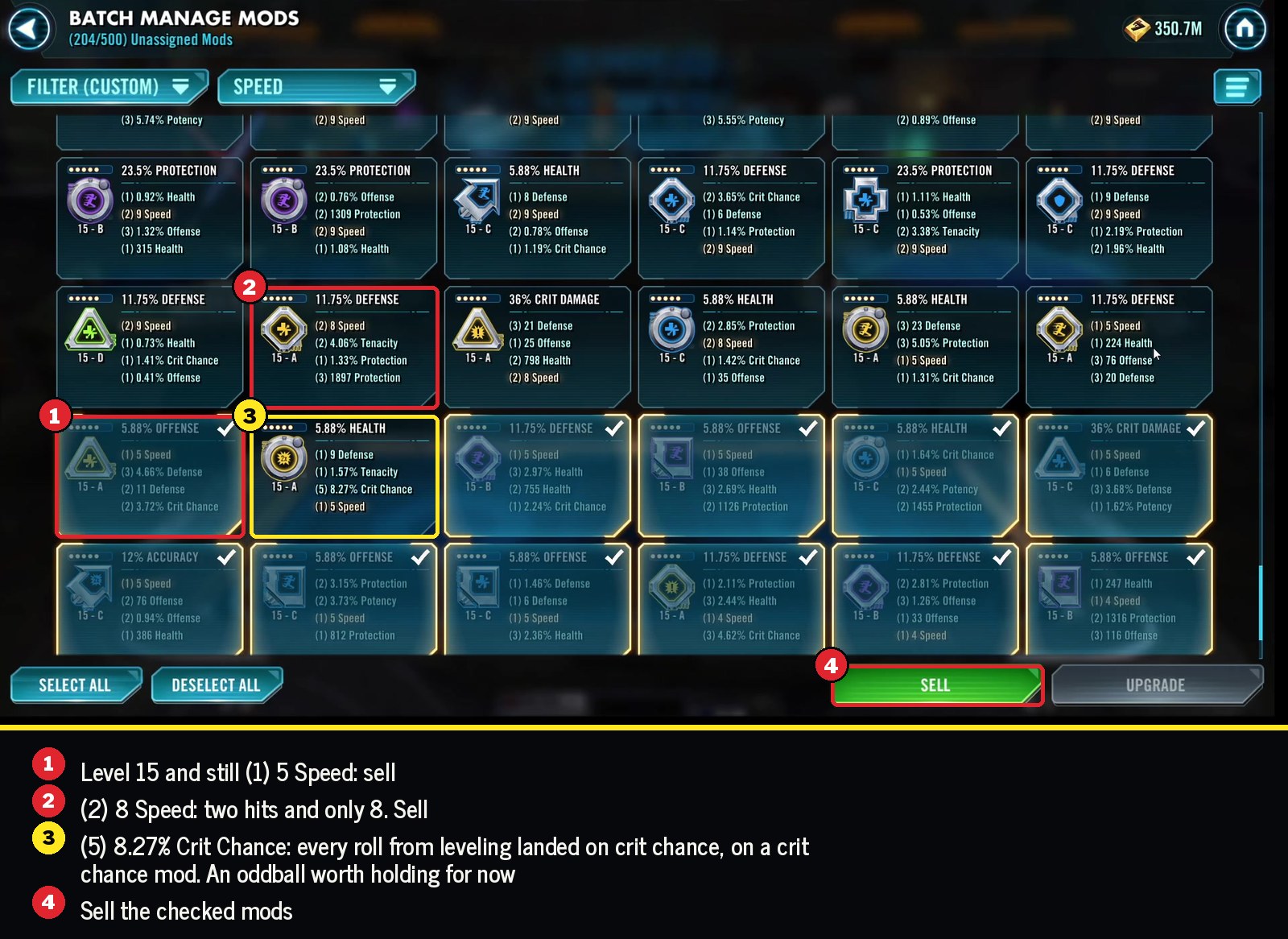
Once a mod is at 15, the number of speed hits makes most decisions quick:
| Speed hits | Sell if speed is | Worth more investment at |
|---|---|---|
| 1 | about 5 or 6 | only if the rest of the mod is excellent |
| 2 | 8 or less | 10 and up |
| 3 | 11 or 12 | 14 and up |
If a mod already has several speed hits and still low speed, the rolls were small. You'd have to roll those hits back off to end up with a good speed mod, and that isn't worth the materials.
A speed set mod with low speed is an easy sell too. I can't think of a situation where I'd want to put a low speed mod with a speed set on somebody.
Among the mods worth keeping, I value the ones that aren't gold yet. They still have tiers left to slice, and every slice is another chance at speed.
This part can be kind of exhausting. You're juggling a lot at once, and sometimes I'll take a break in the middle of it.
Step 4: Only take mods over 15 speed to six dot
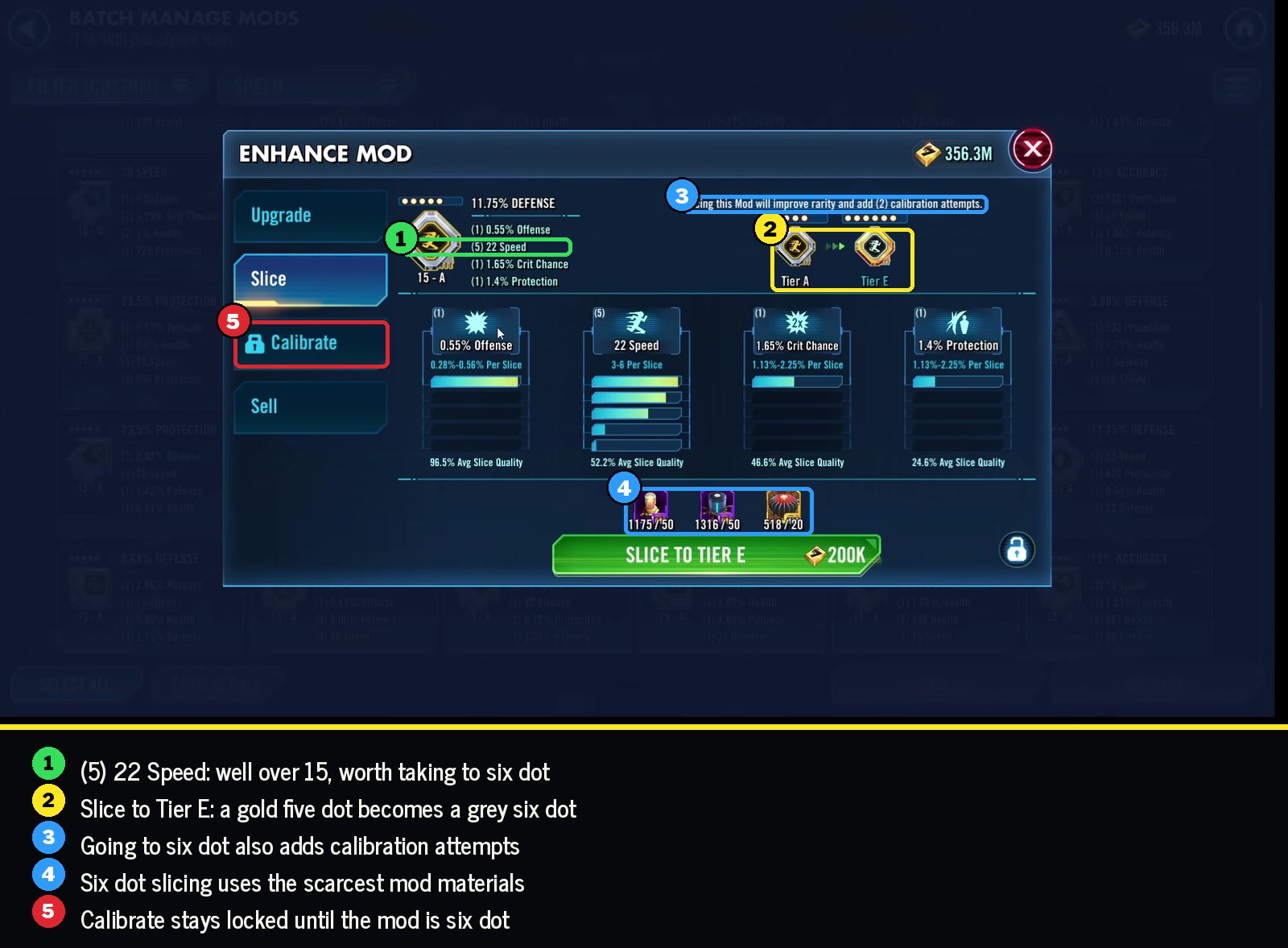
Taking a mod to six dot and slicing it further uses the most limited materials on my account. Unless a mod is amazing in some other way, I don't take it to six dot unless it has more than 15 speed. Getting a lower speed mod up to 25 speed would take several expensive slices.
Once I push a mod to six dot, I always slice it at least once more. From there I might go up to blue if it still needs speed or another stat. Blue is where I usually stop unless it's a really high end mod.
Step 5: Try a cheap calibration on a good speed mod
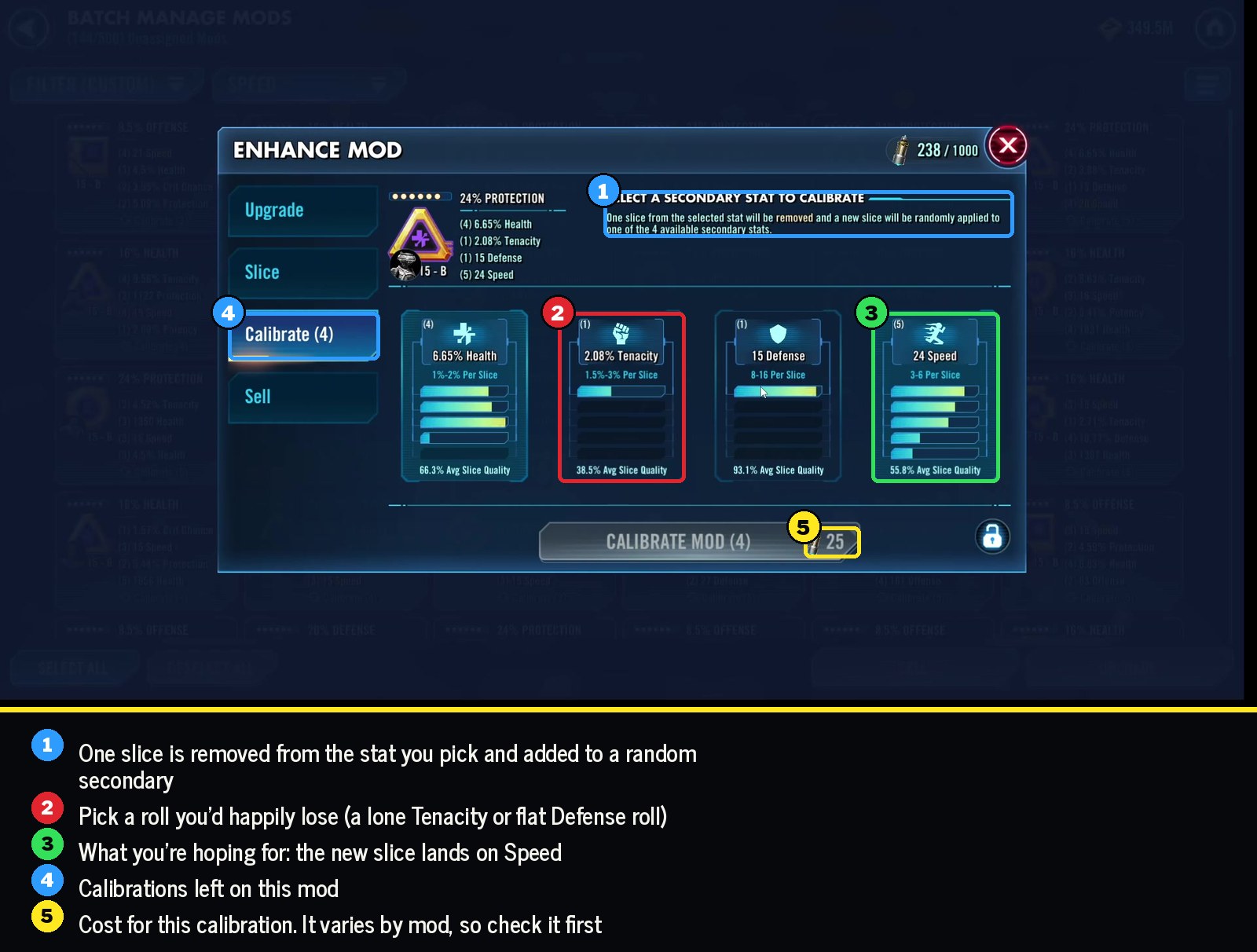
If a strong speed mod has a roll sitting in a stat you don't care about, a calibration can take that roll off, and sometimes it lands on speed. In the walkthrough it's the 22 speed mod from the last step. I'll only try this once or twice. It didn't land on speed, but I'm happy enough with a 23 speed mod, so that one is done.
It's always worth an attempt or two when the cost is low and you don't care much about where else the roll might go.
Step 6: Work through your five dot speed secondaries
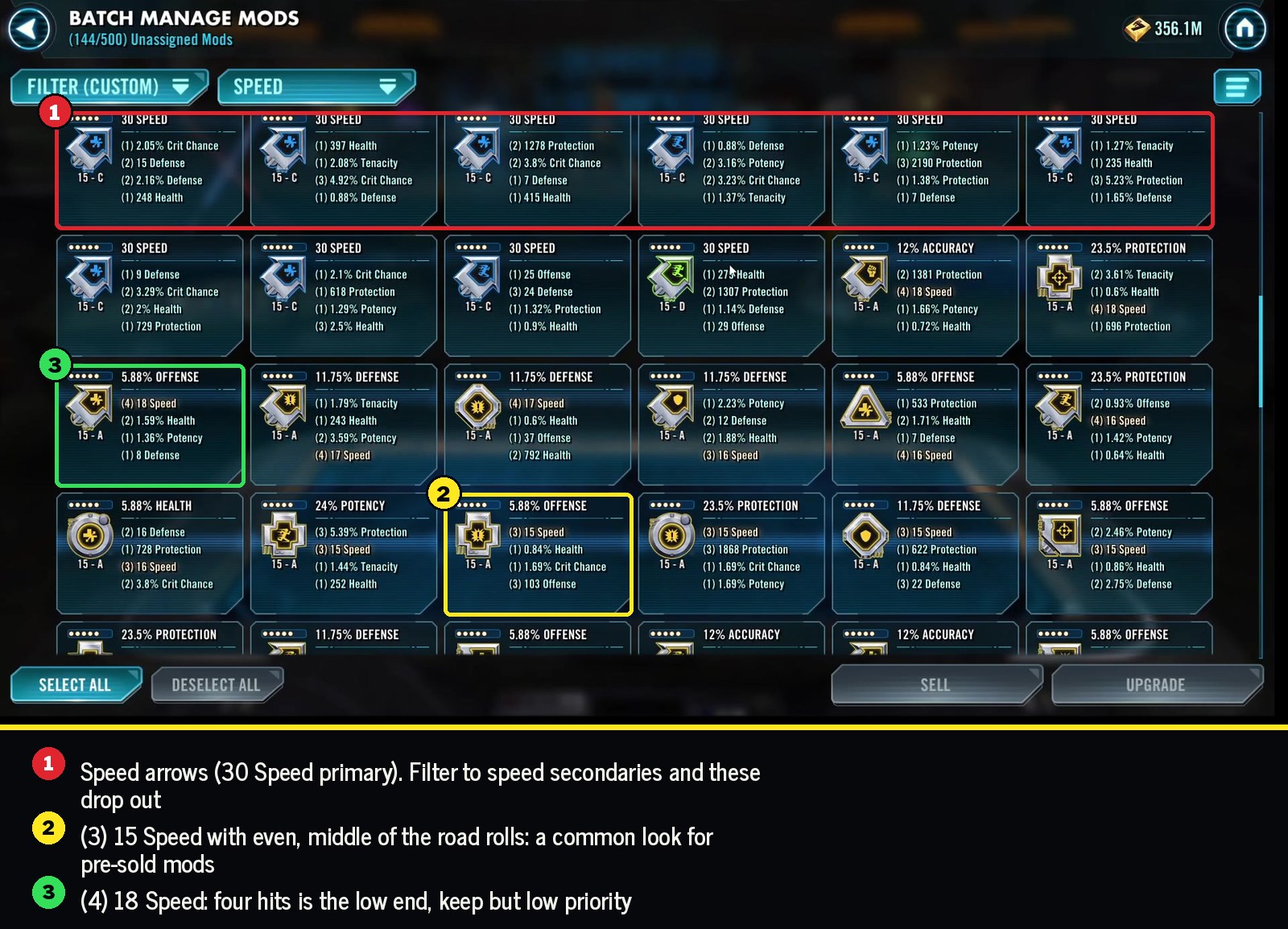
Next, filter your five dot mods to speed secondary only. That drops the arrows out, since their speed is the primary.
A lot of what shows up here are 15 speed mods from the store. When a mod has very even, middle of the road rolls, it's a good sign it was bought. The 15 speed isn't really the value. The value is in the well matched secondaries some of them come with. For an attacker, that's percent offense, flat offense, crit chance and speed together.
Slice a few of the promising ones and see what you get. When a roll lands somewhere useless, like flat defense, try to roll it off, then accept whatever you get. I'm always trying to keep some of these materials in reserve.
It's a numbers game. You're not going to hit speed a lot, and most of these won't turn into anything special. A 16 speed mod is probably too slow for anybody who really needs speed, but it's still a reasonable mod for a character you don't use much or one you only need for something like Conquest.
Step 7: Slice your best six dot mods
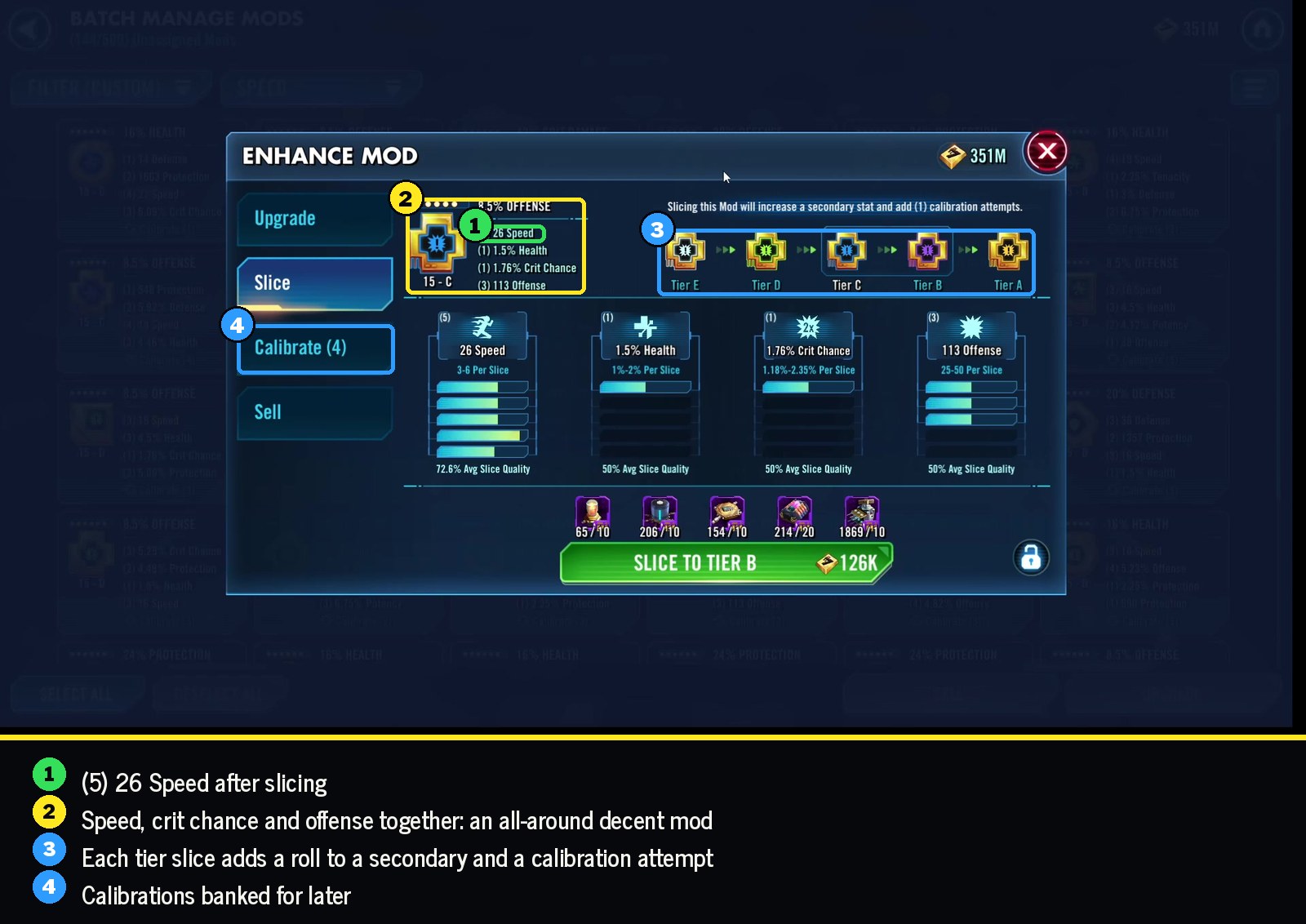
Now filter to six dot mods where speed has rolled fewer than five times, sorted by speed. Those still have room to gain speed. I never leave a six dot mod grey, since the first slice is so cheap.
Pick which ones to slice based on the secondaries you like and how much material you have. A few things I go by:
- If a mod has one stat you don't care about, like potency on an attacker's crit damage mod, rolling that off is an easy call.
- I almost always keep a new speed roll. Very rarely will I not.
- I don't buy mod energy refreshes to finish a batch. If I'm one refresh short, I wait for it to come back.
Step 8: A few gamble clicks on purple mods
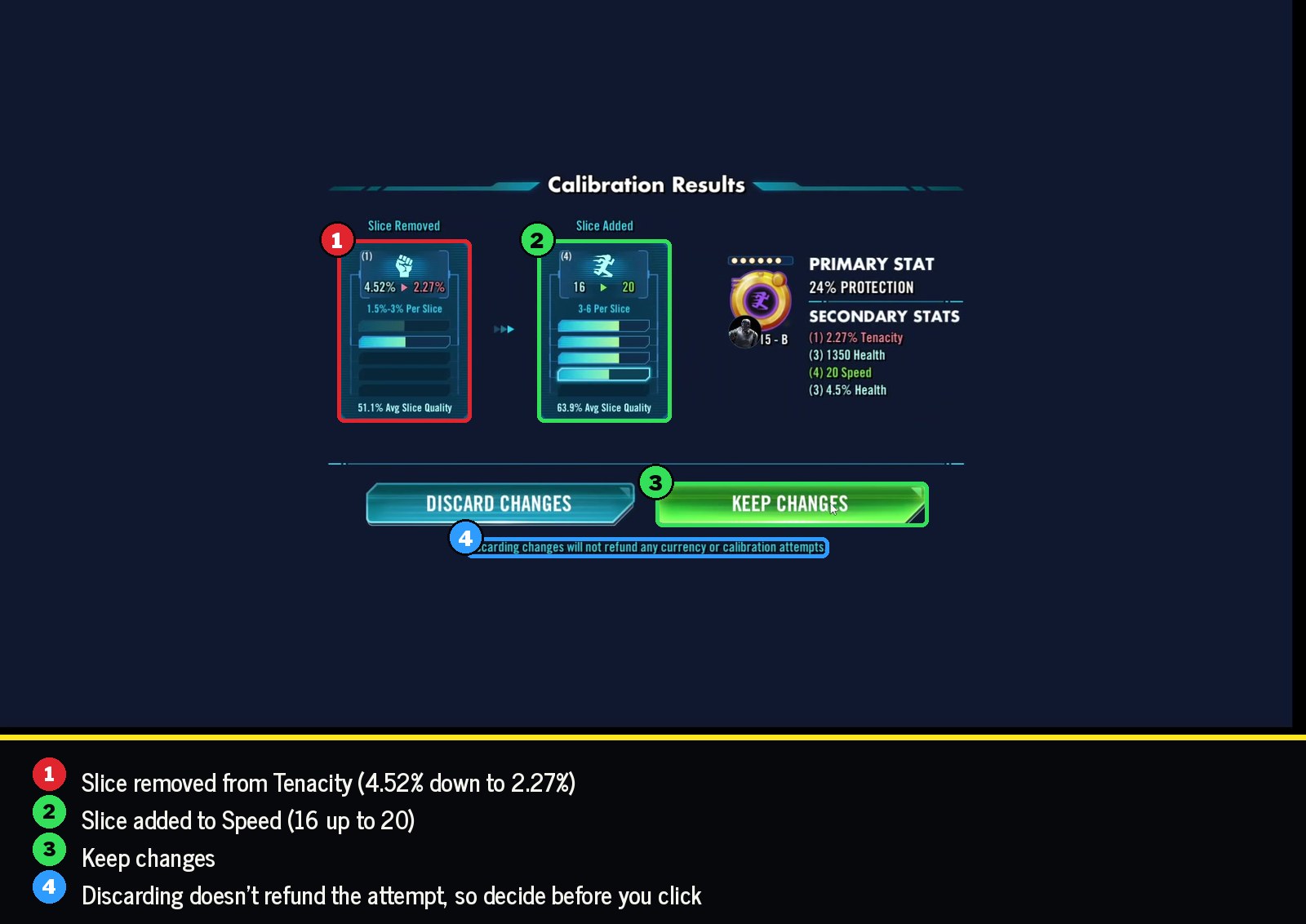
Last, I turn off the unassigned filter so I can see mods that are already on characters, and look at purple mods with room left on speed. Then I take a couple of gamble clicks on the best ones.
Check the calibration cost before you calibrate. The mods I'd rather calibrate cost something like 15. At 40 or more it usually isn't a great choice.
I also look at which secondaries still have room. A mod with percent offense and speed that can both still grow is more likely to turn out well than one where the useful stats are maxed out.
Mod your account, not one character
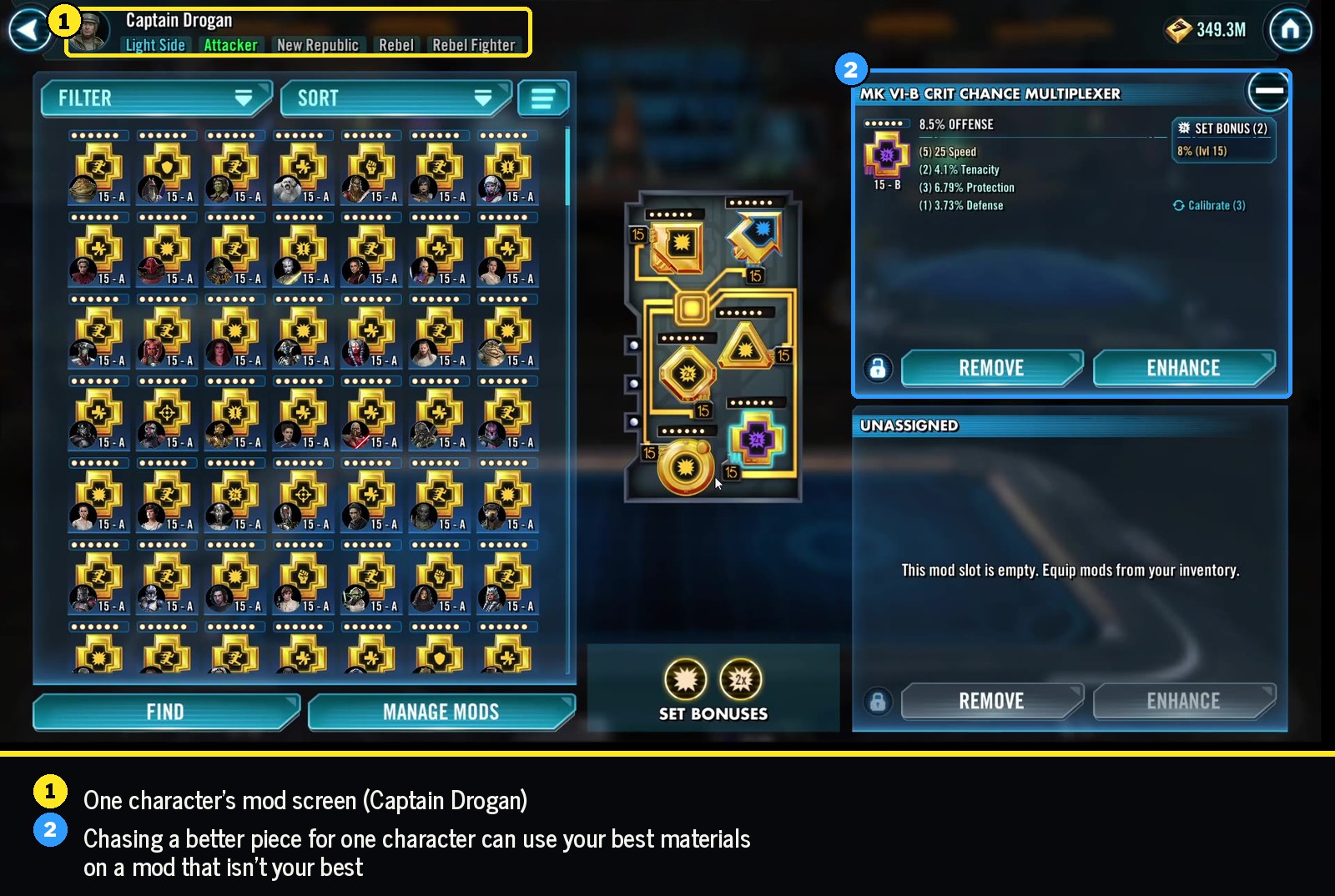
It's easy to get pulled into fixing one team at a time. Say my Leia team keeps losing to Ahsoka. I might dig into Captain Drogan's mods and start looking for a better cross.
Sometimes that's worth doing, but I really try not to make it the main way I mod. You end up investing in the mod that's most useful to Drogan right now, and it might only be the tenth best mod on your account.
I think there's a comfort to working on your mods separate from your characters. Get the best mods you can out of what you pull, then assign them later. If you mod your account as a whole, consistently, you'll end up with enough good mods for the characters that really need them, and better mods overall.
Example: one session on my account
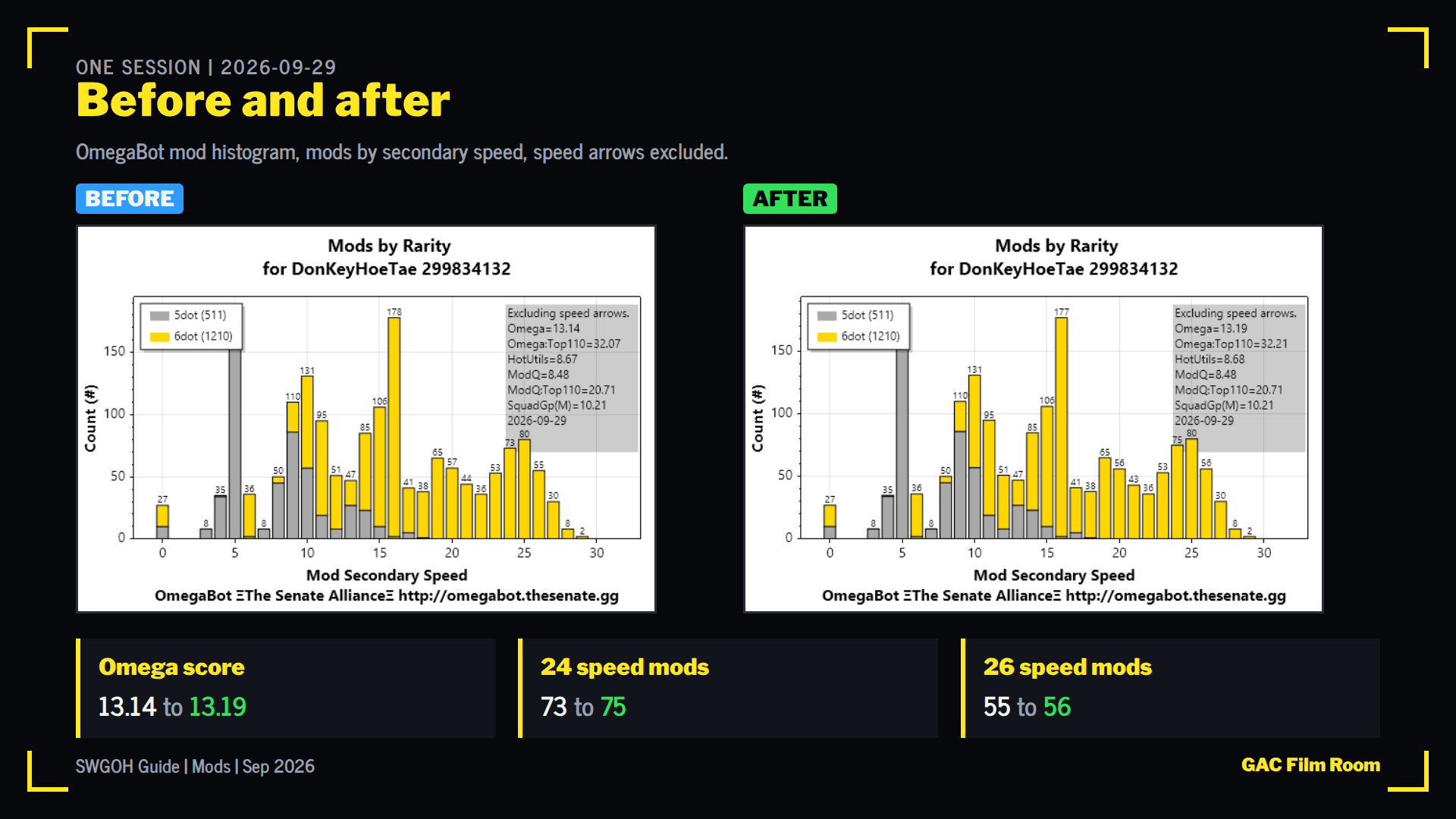
Here's one session measured with OmegaBot's mod histogram. My Omega score went from 13.14 to 13.19, with two more 24 speed mods and one more 26 speed mod. It's a small change. Running this every week or two is how those small changes add up.
Quick reference
- Sell mods with no speed.
- Keep a low speed mod only if something else about it stands out.
- Level to 15, in stages if credits are tight, then work up from the bottom of the speed sort.
- Two speed hits: sell at 8 or less. Three hits: sell at 11 or 12, invest at 14 and up.
- Only take mods over 15 speed to six dot. Slice once more, and usually stop around blue.
- Calibrate only when it's cheap, then accept the result.
- Work on your whole collection, not one character.